Why upgrading from Trados Studio 2021 to 2024 is a smart move

 7 mins read

If you're still using Trados Studio 2021, you might be wondering whether upgrading to the 2024 version is worth it. Here’s the short answer: absolutely!
For over 40 years, Trados has continuously evolved to meet the changing needs of language professionals, enhancing efficiency, integrating cutting-edge AI-powered features, and ensuring that translation quality hits the mark.
Upgrading isn’t just about staying current; it’s about working smarter and faster. In this blog, we’ll explore how Trados Studio 2024 can take your translation workflow to the next level.
Accelerating innovation with AI capabilities
AI’s impact on how we interact with technology every day is impossible to ignore, and we’ve been making sure the translation industry benefits too. AI has been a core part of Studio for years, with built-in access to Language Weaver (six million characters per year included) and dozens of MT providers via the RWS AppStore. Now, with generative AI (GenAI), Studio has evolved further, introducing several AI-powered capabilities:
AI Assistant
AI Assistant brings generative translation to every Studio user, enabling the use of Large Language Models (LLMs) for more intelligent translation workflows. During pre-translation batch tasks, an LLM can serve as a translation provider allowing you to prompt adjustments in the output, such as applying a casual or formal tone, while preserving tags and formatting.
Alternatively, for precise control over translation suggestions, you can interactively use prompts within the editor to refine translations segment by segment, whether they originate from machine translation, translation memory, or the LLM's own output.
And, addressing a common frustration with machine translation, the AI Assistant ensures translations are not only fluent but also adhere to your specified terminology. By automatically applying your preferred terms, it enhances consistency and efficiency.
Note: To use the AI Assistant, you will need an LLM subscription to your provider of choice. Currently, you can choose between OpenAI or Azure LLMs, with support for more providers planned in the future.
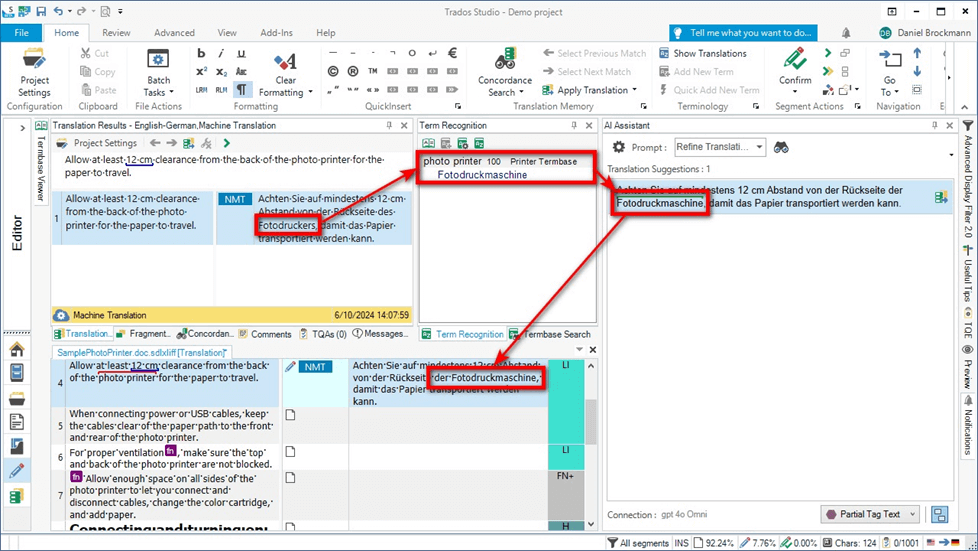
Image of AI Assistant adapting terminology in an MT suggestion using an LLM
Smart Help in the cloud
Smart Help eliminates the tedious task of searching through product documentation. Available in the cloud interface, it allows users to type questions in natural language. The AI chatbot then instantly provides relevant answers and links to detailed documentation – no searching required.
Language Weaver MTQE
Language Weaver Machine Translation Quality Estimation (MTQE) is an AI model that assesses the quality of machine translation output. Language Weaver MTQE results will be displayed in both the desktop and online editor, with segments flagged as good (green), adequate (yellow), or poor (red), helping translators and reviewers focus their efforts where needed. For those using an alternative MTQE provider, their scores can also now be displayed natively in the Studio editor.
Neural Fragment Recall
Neural Fragment Recall is an AI-powered evolution of the upLIFT Fragment Recall feature, revolutionizing translation efficiency from cloud-based translation memories. Unlike its predecessor, which relied on statistical alignment and required large translation memories, Neural Fragment Recall leverages AI-based neural alignment to deliver faster, more accurate fragment suggestions in real-time. This enhancement leads to improved consistency, better handling of less repetitive content (such as legal and public sector texts) and eliminates the need for a minimum translation memory size, allowing translators to benefit immediately.
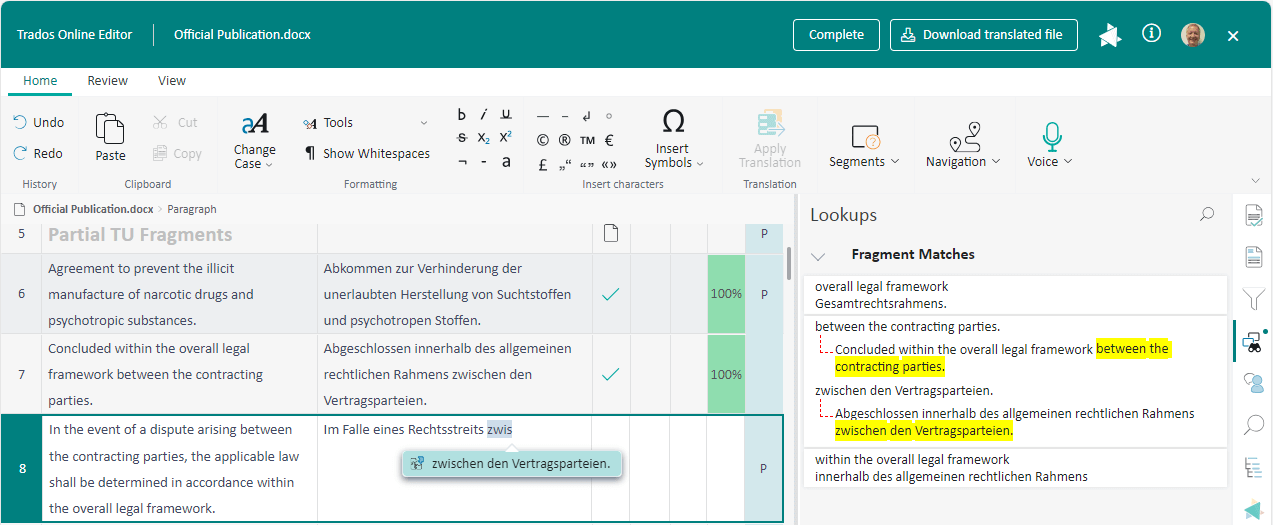
Image of Neural Fragment Recall in the online editor
Greater flexibility and choice in how you work
The Manager view
A new Manager view has been significantly finetuned since its original release in 2022, giving you a whole new way to work with files and projects created or stored in the cloud, on a server or locally. With the Manager view, you no longer need to jump between separate areas for managing projects and files. You can work with both in a more unified way, in a single window with a clean, modern UI (inspired by the cloud platform) that makes navigating between projects and files much more intuitive.
The view also includes key file- and-project-related analytics and reports so that you have everything you need in one place. With multi-window and multi-monitor support, it’s very flexible in letting you work on and compare multiple projects at once.
The original projects and files views are still available – this is an additional option so you can choose whichever you prefer.
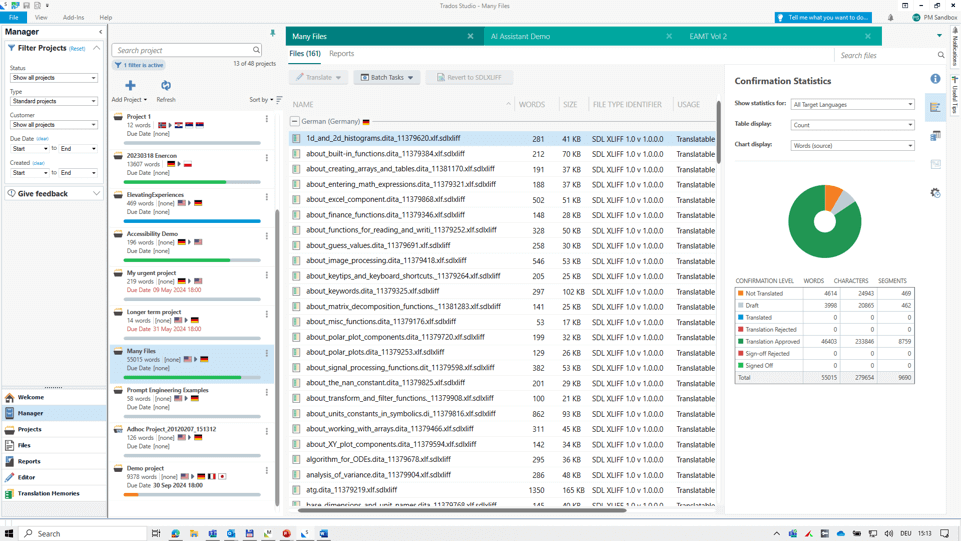
Image of the Manager view
Revamping other areas of Studio
We have introduced several enhancements to improve user experience and functionality:
- Real-time previews matter to most of you, and we’ve changed their underlying technology to create a more stable preview platform. This also eliminates frustrations such as the cursor disappearing after clicking into the preview window
- Automatic insertion of formatting tags into translation segments to ensure that formatting is reliably replicated from source to target with minimal effort
- The alignment editor may not be an everyday tool for everyone, but if you use it you’ll now be able to adapt the font size, making it easier to work with documents that aren’t easily legible.
Better accessibility
Trados Studio 2024 takes a major step toward making translation more inclusive and accessible to all. While previous versions offered features like variable font sizes and keyboard shortcuts, this release introduces enhanced screen reader support for JAWS and NVDA, allowing visually impaired users to navigate key areas like the ribbon, project wizard, and desktop editor.
Beyond accessibility, these improvements benefit everyone: sharper text processing enhances clarity, especially for bi-directional languages, and voice input compatibility extends Studio’s usability with third-party tools. Additionally, new integrations open exciting automation possibilities, with Grammarly now available in the editor for real-time spelling, grammar, and clarity checks. Full AutoHotkey macro support further expands customization options.
In the online editor, you can now transcribe text and execute over 130 actions using voice input or commands, available in nine languages so far: Simplified Chinese, Czech, US English, French, German, Italian, Japanese, Romanian, and Spanish. This marks a significant step forward in usability for anyone who prefers dictation over typing or voice commands over a keyboard and mouse. For many users and scenarios, voice input isn’t just more convenient; it’s often faster and more accurate.
Expanded file format support
Trados Studio 2024 now supports over 50 file formats, allowing translation teams and businesses to handle a broader range of projects. Key updates ensure compatibility with the latest industry standards, including:
- Support for Microsoft .NET formats like WinForms and WPF allows translators to work with binary software files, ensuring proper context recognition and code signing
- The Multilingual Excel app, streamlines the translation of localization strings for the gaming industry, handling tasks such as column mapping and embedded content
- Support for Adobe InDesign 2023 files has been introduced, enhancing compatibility with design projects
- Full compatibility with modern comments in Microsoft PowerPoint, improving the translation of presentations.
Strengthening our cloud and desktop integration
Trados Studio comes with both a desktop application and a browser environment, for no extra cost. With the 2024 release, we’re enhancing this hybrid approach, making it easier than ever to work seamlessly across devices, switch between desktop and browser mid-task, and choose when and how to leverage cloud-based efficiencies in your workflow.
We’re investing equally in both environments, ensuring that whether you prefer working on the desktop, in the browser, or a combination of both, you’ll have a smooth and efficient experience.
With an upgrade to Studio 2024 you have access to:
- The ability to leverage cloud translation engines (containing translation memories, termbases, machine translation and LLMs) for batch translation processes in the desktop application
- Over 100 developments made to the online editor, including smart actions so you can now quickly replicate tags, acronyms, terms or formatting from the source to the target segment. And new Document Structure Information (DSI) panel that can remain in view while you’re working in the online editor
- Migration wizards to easily save local translation memories and termbases from Trados Studio to the cloud
- Improved cloud terminology management for easier management of your terms – cloud terminology now aligns more closely with MultiTerm, with features like ‘quick-add term’ available in the online editor. In addition, several feature and compatibility updates to MultiTerm 2024 are included, which you can learn more about in our release notes.
Upgrade to Trados Studio 2024 today
It's not just about taking advantage of all the amazing features mentioned above that help you save time, improve quality, and create a smarter, more flexible translation workflow. By keeping your IT environment up to date, you ensure better reliability and compatibility. Plus, upgrading to the latest version means you'll also benefit from continuous product updates and the possibility to quickly receive answers to your queries from a dedicated support team.
Ready to take your translation workflow to the next level?
🚀 Learn more: Check out our what’s new brochure and release notes
🎥 Watch our webinar: See Studio 2024 in action
💻 Upgrade now: Freelancers can purchase via our pricing page, while corporations and LSPs should contact their account manager or reach out to us directly