What’s new in Trados Studio 2024 SR1: Smarter, faster, easier than ever

 10 mins read

In the fast-paced, AI-impacted world of translation, every second counts. That’s why Trados Studio 2024 Service Release 1 (SR1) is packed with over 600 enhancements and fixes - our biggest release yet. It’s designed to help you work smarter, faster and easier, so you can focus on what really matters: delivering great translations as efficiently as possible.
Our latest update puts AI at the heart of your workflow, allowing you to connect any large language model of your choice to the AI Assistant for greater flexibility. Platform modernization leads to quicker navigation, faster Editor and more seamless working with terminology. Project handling - whether from the desktop, cloud or GroupShare - is easier and more seamless, helping you stay focused and productive.
Let’s take a look at the details of what’s new - and how it helps you translate more efficiently than ever.
Smarter ways of working
Get answers instantly, without leaving the desktop
Need help but don’t want to leave where you are working? Now you don’t have to.
Smart Help is now available wherever you choose to work in Trados Studio - on the desktop or in the browser. This AI-powered virtual assistant uses our own secure large language model (LLM) to deliver intelligent, real-time support - right when and where you need it.
Just type your question into the Copilot window, and Smart Help will provide a clear, direct answer - along with links to the most relevant sections of our product documentation. No more digging through pages or switching between tabs.
It’s fast, simple, and designed to keep you focused on what matters most: translating.
Plug in any LLM to AI Assistant
The AI Assistant in Trados Studio brings generative translation capabilities to every user. In fact, we are now seeing nearly 2 million prompt searches each month, a number that continues to grow. It lets you harness an LLM in multiple ways:
- Translation provider – Powers real-time translation suggestions during pre-translation and as you work through a file in the editor.
- Translation companion – Enables interactive prompting directly in the editor. Ask for alternative translations, rewrite suggestions, or assistance during review.
To work with AI Assistant, you need to download an LLM app from the RWS AppStore (you’ll need your own subscription). Currently, OpenAI and Azure OpenAI have supported apps available.
However, we’ve taken a big step forward in making the AI Assistant more flexible and developer-friendly, so you can expect more options to follow soon. Just as we previously opened up the platform to support any machine translation provider (now well over 80!), we’ve now extended that openness to large language models (LLMs).
Developers can now integrate any large language model (LLM) into Trados Studio's AI Assistant by following a set of guidelines which typically consist of developing a translation provider as well as an editing companion plug-in. Whether it's Gemini, Claude, or another provider, the AI Assistant framework is now designed to support it. This gives you the freedom to choose the AI provider that best fits your needs - without being locked into a single option.
To kick things off, we’ve adapted the existing OpenAI integration to fit this new plugin-based architecture. From a user perspective, it looks and behaves the same – but under the hood, it’s now just one of many possible plugins. This means the same interface you’re familiar with can now support any LLM moving forward.
Local AI for translators (beta)
Hugging Face’s mission is to democratize AI, and with our new integration in Trados Studio, that vision is becoming a reality for translators. Please note: this integration is currently in beta. To access Hugging Face in Studio, you’ll need to join the beta testing group.
Gone are the days when running or customizing AI models required costly infrastructure or advanced technical skills. Today, translators and language professionals can connect directly to thousands of machine translation (NMT) and large language models (LLMs) - all from within Trados Studio.
Even better, you can download and run these models locally, without relying on the cloud. That means you retain full control over your data, while still benefiting from powerful AI capabilities.
Why this matters:
- Customize with your own data - Fine-tune pre-trained models using your translation memories, termbases, and domain-specific content to improve translation quality.
- Stay secure and compliant - Run models in your local environment - ideal for users with strict data privacy or regulatory requirements.
- No complex setup needed - Hugging Face makes it easy for non-technical users to access and work with advanced AI locally.
This integration also serves as a bridge between the AI Assistant in Studio and local model hosting. You can plug in downloaded models, interact with them through the AI Assistant, and get real-time translation suggestions and use prompts - all without needing to send content to the cloud.
Interested in testing the Hugging Face integration? Contact us at amsabo@rws.com to join the beta testing group.
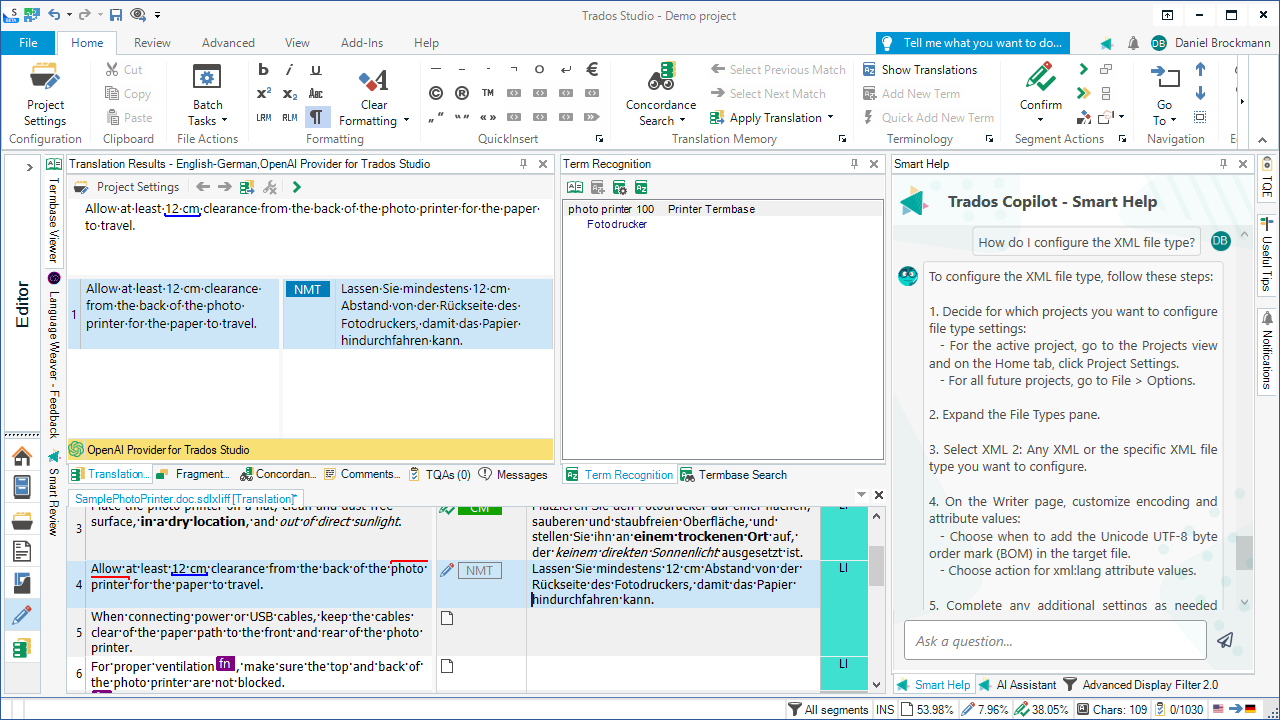
Image showing Smart Help in the desktop editor
Faster than ever
Less waiting, more translating
We’ve been hard at work modernizing Trados Studio to make your translation experience smoother, faster, and more efficient. With our latest updates, you’ll notice significant performance improvements across the board - so you can spend less time waiting and more time translating.
Opening files is now up to 30% faster, meaning you can get to work more quickly. Interacting with the Studio interface feels more responsive, and navigation within the Editor - like switching between open document tabs - is noticeably quicker than before. We’ve also made frequent operations such as locking large numbers of segments a lot faster, saving you valuable time on repetitive tasks.
Better terminology handling
Terminology has long played a critical role in maintaining consistency and quality across translations. Now, it can also be used to improve the accuracy of large language model (LLM) output. For example, with the AI Assistant, you can automatically apply your preferred terminology by directing it to use your termbase during translation.
Terminology management is now easier and faster than ever in Trados Studio. We’ve modernized the way terminology is handled, with all processing now happening entirely within Studio - creating a more seamless, robust experience. This behind-the-scenes overhaul simplifies the architecture and lays the groundwork for future enhancements. (Don’t worry – you can still use MultiTerm when you need more advanced termbase editing.)
What does this mean for you?
- Faster and more reliable term recognition
- Instant term additions to termbases directly from Studio
- Overall improved performance and stability
Managing multiple termbases is now also more intuitive. The Termbase Viewer supports tabbed navigation, with each tab showing a loaded termbase - local or server-based - clearly labeled and easily accessible. No need to dive into Project Settings just to switch views. And, term recognition and search now pull results from all loaded termbases more reliably, ensuring nothing is missed.
One of the most-requested improvements is finally here: hitlist settings are now part of project settings, not just user settings. This means project managers can define how terminology should appear – such as sort order, filters, or visible fields- and that configuration will automatically apply to everyone working on the project. No more manual setup for each user.
Previously, each user in the supply chain had to manually adjust hitlist settings to match the project’s requirements. Now, the correct settings are included in the project package from the start, eliminating setup headaches and ensuring consistency across your team.
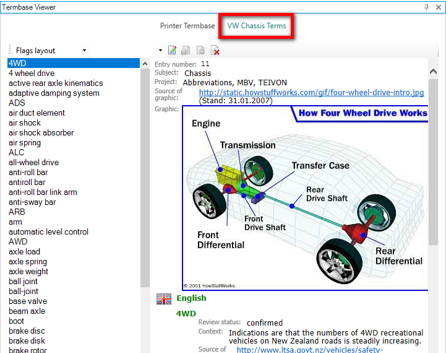
Image showing tabbed navigation in the termbase viewer
Easier to use
A smoother experience, no matter the project type
The latest updates to Trados Studio bring a significantly more seamless experience when working with both cloud-based and GroupShare projects. From easier file handling to smarter resource retention and better visibility of metadata, these enhancements are designed to remove friction and streamline your translation workflow - wherever and however you work.
We have improved cloud project integration in the following ways:
- Download all cloud files at once - Previously, downloading files from cloud projects meant grabbing them one at a time - frustrating and time-consuming. Now, with a single command, you can download all files in a project in one go, making it easier to get started and stay productive.
- Local provider settings preserved - In hybrid scenarios, MT providers added locally, like ModernMT used to be lost when projects moved to the cloud and back. Now, your chosen provider settings stay intact - saving you time and reducing rework.
- Custom project fields now visible in Studio - Custom metadata such as a “Cost Center” field in your cloud projects will now be clearly visible in Studio, bringing more context directly into the desktop.
...and many more.
We have also improved GroupShare project integration in the following ways:
- Two-Factor Authentication (2FA) - For added security, Trados Studio now supports 2FA when accessing GroupShare resources - giving your organization extra protection beyond just usernames and passwords.
- Edit GroupShare templates directly in Studio - You can now manage your GroupShare project templates right from within Studio. Use the Project Template Setup dialog to import, edit, and upload templates, just like you would with local templates.
- View and attach custom project fields in GroupShare - Studio now supports viewing and attaching custom metadata fields for GroupShare server-based projects, aligning with how metadata is handled in cloud projects.
A more accessible AppStore experience in Trados Studio
We’ve given the built-in AppStore a complete overhaul - and the results go far beyond a visual refresh. The updated interface is not only more modern and intuitive, but also fully accessible, making it easier for everyone to explore, install, and manage apps that extend Trados Studio.
Accessibility has been a key driver in this redesign, and as we’ve seen in other areas of Studio (like the improved Manager view, the ribbon, project wizard, and, most importantly, the desktop editor), designing for accessibility naturally improves the overall usability. Screen reader software such as JAWS and NVDA can now access and interpret key features and screens. The new AppStore interface is cleaner, more navigable, and better organized - a win for all users.
This revamp brings:
- Larger, clearer tiles for installed apps, making it easier to browse and manage your tools at a glance.
- Improved search and filtering so you can find what you need faster.
- Streamlined navigation, with categories clearly separated on the left-hand panel:
- AppStore (featuring both public and private apps)
- Resources (quick access to documentation, support, and community forums)
- Settings (manage preferences and configurations)
Useability improvements for streamlined working
We continue to deliver usability updates designed to make your day-to-day work smoother, faster, and more intuitive. From the Editor to translation memory handling and project management in the Manager View, every corner of the platform is getting smarter and more efficient.
In the Editor, applying find and display filters now visually highlights results using clear rectangles. This makes it much easier to spot filtered content as you work through your files. Additionally, the Comments view has been improved to match the font size of the main Editor. This means that as you increase or decrease your Editor’s font for readability, your comments will now adjust accordingly, making it more comfortable to review feedback.
Translation memory handling has also become more streamlined. You can now add TMX files directly as file-based translation memories, without any need for conversion. This simplifies workflows and allows you to put existing resources to use more quickly than ever before.
The Manager View has received several enhancements aimed at improving navigation and oversight. A new folder structure pane has been added to the right-hand side of the window, giving you a clearer overview of your project’s organization and making it easier to work with complex file setups. When creating local projects where files are merged into a single .sdlxliff, the Manager View now shows not only the merged file but also the individual source files that contributed to it. These can be expanded with a click, offering transparency and control over the file structure.

Image showing clearer highlighting of find search results in editor
To see everything that’s new in Trados Studio 2024 SR1, check out our full release notes for all the details. And if you'd like to see the updates in action, don’t miss our upcoming webinar - register now to learn how to get the most out of the latest release.
Trados Studio 2024 SR1 is packed with updates that help you translate faster, smarter, and easier - no matter how you work. Now is the perfect time to upgrade and take full advantage of everything Studio has to offer.