Make smarter, faster decisions with Smart Insights – now available for Trados Team and Accelerate users

 8 mins read

Localization project managers face constant pressure to deliver high-quality translations on time and within budget, often across multiple projects, languages, and stakeholders. But when data is buried in static reports or spread across systems, making fast, informed decisions becomes a real challenge.
That’s where Smart Insights, a new Trados Copilot skill, comes in. Initially released to our Trados Enterprise customers, we’re excited to announce that this new AI-powered capability is now available as an add-on for Trados Team and Trados Accelerate customers.
Smarter decisions, made simple
Smart Insights transforms how project managers interact with translation project data, giving you the confidence to lead, even when priorities are shifting fast. Instead of relying on static reports or manual analysis, you can ask natural-language questions, such as:
- “Show me the projects due to be delivered in the next 5 days for customer [NAME]”
- “Show me a list of in progress translation tasks that are overdue?”
- “What tasks are assigned to [LINGUIST NAME] in German?”
In seconds, Smart Insights provides visual summaries alongside a narrative explanation of the data, making it easier to interpret results and take informed action. Whether you're managing a handful of jobs or coordinating across global teams, it’s a smarter, faster way to make confident decisions, without the guesswork.
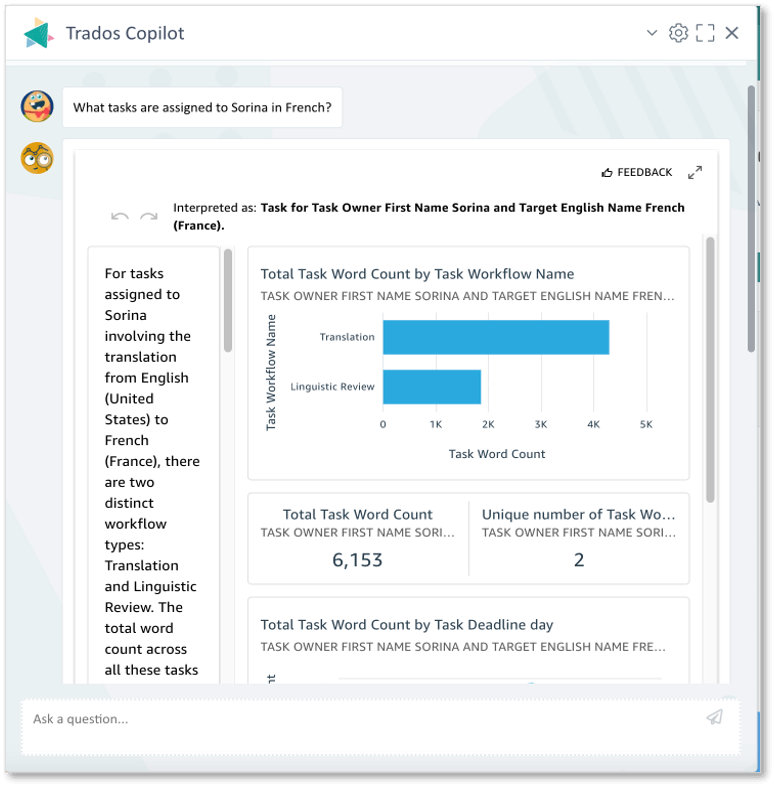
Screenshot showing Smart Insights in Trados
Secure, permission-based insights
Rest assured, Smart Insights only uses the data already available within your Trados account. The insights you receive are shaped by your specific offering and access rights, ensuring strict adherence to your organization’s data visibility rules.
Still need standardized reports? We’ve got you covered.
Smart Insights is designed to give you fast, flexible answers when you need them most - but it’s not here to replace our existing custom reporting module. They both serve different (but equally important) purposes.
Here’s a quick guide to when you might use each:
Use Smart Insights when…
- You need answers fast to gain real-time insights.
- You’re exploring or troubleshooting – e.g. looking for anomalies, or drilling into unexpected trends.
- The data you need isn’t available in an existing report or you aren’t sure where to find it in the UI.
- You’re not a data expert, but want access to insights without relying on analysts or business intelligence (BI) tools.
Use custom reporting when…
- You need recurring, standardized reports – e.g. weekly KPIs or executive dashboards.
- You need to consolidate multiple data sources into a single dashboard for easy sharing.
- You have specific formatting or compliance requirements.
- You need to track long-term trends or meet audit obligations.
In summary, Smart Insights is great for on-the-spot decision-making, while custom reporting is ideal for standardized, repeatable analysis. Together, they give you the flexibility to manage your data your way.
Ready to try it?
All existing customers can try Smart Insights today - a free trial is now available in your account. Simply head to Trados Copilot to activate. The trial includes 50 questions and runs for 30 days from activation.
To help you get started, we’ve also created a free eLearning course that walks you through how to use Smart Insights effectively - from asking your first question to interpreting results. The course is available here. Plus, you can also explore a list of sample questions to get familiar with the type of questions you can ask. We update this regularly, so be sure to bookmark the link and check back often!
Want to learn more? Watch our webinar recording or contact us to speak with a member of the team.